

Todoist to a garage organization project: complete 2026 workflow
Instead of rebuilding a garage to-do list every weekend, use Todoist as your garage organization project checklist app: capture the work, divide it into zones, schedule manageable sessions, and repeat a reset after the clutter is cleared. This 2026 guide connects your digital checklist to physical sorting, storage decisions, and donation follow-through without adding another automation service.
- Use Todoist as your garage organization project checklist app for actionable tasks, not a detailed household inventory.
- Stashsavvy recommends sorting before storage shopping so your garage checklist reflects what you actually keep.
- Separate the initial garage decluttering project from recurring maintenance tasks.
- Complete donation tasks when items leave your home, not when you finish sorting them.
Why this matters
A task called “organize garage” hides several different jobs: deciding what stays, arranging removal, measuring storage areas, and putting belongings away. Todoist helps you separate those decisions, but the checklist still needs a physical destination for every item.
Stashsavvy’s garage organization guidance is best for homeowners and renters who want practical steps before buying storage. This workflow follows that approach: use what you already own, sort a manageable area, and purchase organizers only after identifying a specific gap.
For your 2026 project, define a finish line you can see: garden tools returned to their homes, donation boxes removed, or a cleared parking space. Use the guide to how long a garage organization project takes to think through scope before assigning dates.
Before you start
- Access: Sign in to Todoist on the device you will use in the garage. Use the web or desktop app for the setup below; mobile navigation differs. If someone will help, agree on responsibilities before assigning work.
- Materials: Gather a measuring tape, temporary sorting containers, and something to mark their contents. Choose a starting area and a destination for donations. Renters should check permission requirements before planning mounted storage.
- The easy-to-miss gotcha: Keep one-time decluttering separate from recurring maintenance. Completing a recurring Todoist task advances its schedule; it does not create a fresh copy of an entire garage checklist.
You do not need a second app connection for this workflow. Todoist holds the actions; your garage holds the belongings. Treat the checklist as a work plan rather than proof that a shelf, wall, or ceiling can safely support storage.
Set up your garage project
Create a project with a visible finish line
- In Todoist’s project area, choose Add project. Enter Garage reset 2026 in Name, choose List for the view, and select Add. A list keeps the sequence readable while you build the checklist.
- Add a task with Add task called “Define the finished garage.” Open it and use Description to record what the garage must accommodate: parked vehicles, bikes, tools, or household supplies. Describe the result rather than an idealized makeover.
- Choose Add section to create these sections: Plan, Sort, Remove, Store, and Maintain. These are custom section names, not built-in Todoist categories.
- In Plan, add “Photograph the starting area” and “Choose the first work zone.” Keep personal documents and identifying details out of any photos you share.
- Add “Check storage restrictions” if you rent or share the garage. Record permission requirements before adding installation tasks that depend on them.
Expected result: You have one project with a defined outcome and separate places for planning, sorting, removal, storage, and upkeep. Nothing needs a date yet.
Keep the scope small enough to finish without spreading loose belongings across the whole garage. A shelf, workbench, or gardening corner is a better starting unit than every box you own. Leave garage-door mechanisms, exits, and required access areas unobstructed throughout the work.
Turn vague jobs into finishable tasks
A useful task names an action and its location. “Sort gardening supplies on the lower shelf” gives you somewhere to begin; “deal with stuff” does not.
Use Description for decisions that would otherwise disappear between sessions. For example: “Keep current hand tools together; set unidentified chemicals aside for disposal guidance.” Do not turn chemical handling into a general decluttering task; follow product labels and local disposal instructions.
Build your zone checklist
Add actions in the order you will perform them
- Under Sort, select Add task and enter “Sort the gardening shelf.” Open the task and use Add sub-task for the smaller actions below. Repeat this structure only for zones that need it.
- Add “Separate items to keep, donate, recycle, or discard.” Use temporary containers you already have. Keep questionable items separate rather than assigning them a permanent home immediately.
- Add “Group retained items by use.” Put gardening supplies together, cycling equipment together, and frequently used tools together. This reveals the storage problem before you try to solve it.
- Under Remove, add a specific exit task such as “Take accepted gardening donations to the chosen organization.” Record acceptance requirements in Description after checking them with the recipient.
- Under Store, add “Measure the cleared shelf and retained items.” Record the usable dimensions and any obstructions before choosing containers or racks.
- Add “Return retained gardening supplies to the shelf.” Define completion as everything stored and the working area cleared, not merely sorted into piles.
Expected result: Each zone has a path from sorting to removal to storage. You can identify the next physical action without reopening every box.
The sequence matters more than the number of tasks. Sort before measuring for new organizers, and measure before choosing storage. A checklist cannot prevent an unnecessary purchase unless you put the purchase decision after the sorting work.
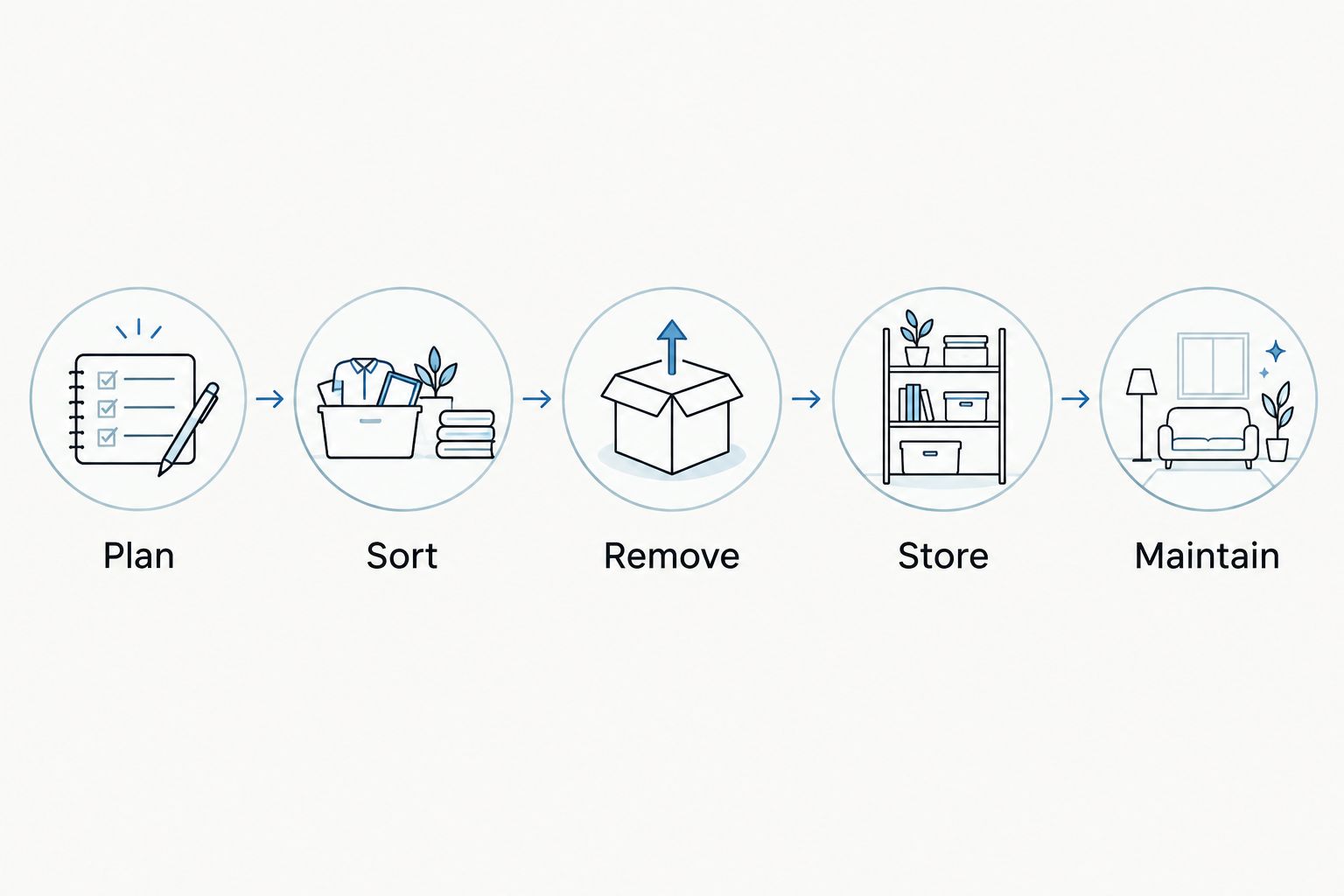
Give outgoing items their own finish line
Moving a box beside the door is progress, but it is not removal. Keep the task open until the contents reach the agreed destination.
For items you plan to sell, separate “Prepare listing” from “Complete handoff.” The first action does not guarantee the second. Choose a fallback decision in advance so unsold belongings do not occupy the same corner indefinitely.
Stashsavvy recommends writing the destination into the task title when possible. “Deliver accepted sports gear to donation center” is more useful during a busy week than “Donations.”
Schedule and verify your first session
Assign dates to actions, not wishes
- Open the next actionable task and select Date. Choose the day you will do the work. Do not date every future storage task before you know what sorting will reveal.
- Choose a 15-minute planning session to inspect one zone and gather materials. This is a suggested time box, not an estimate of how long garage organization takes.
- Schedule a 30-minute sorting session for that zone. Put the time box in Description and stop with belongings safely contained if the work takes longer.
- Give the removal task its own date after confirming the destination’s requirements. Keep storage shopping unscheduled until you have the retained items and measurements.
- Complete one small task using the completion circle beside its name. Confirm that only the finished action disappears from your active list; leave unfinished sorting, removal, and storage tasks open.
- At the end of the session, write the next physical action in the remaining task’s Description. “Sort the unopened box on the left” makes restarting easier than reconstructing what happened.
Expected result: Your dated list shows work you can actually begin, while dependent tasks remain visible in the project without becoming premature obligations.
For your 2026 cleanup, use dates as commitments you review, not decoration. When a session is missed, choose another realistic date and reduce the scope if necessary. Moving the same oversized task repeatedly does not make it more actionable.
Check the physical result
Before marking a zone complete, inspect it in person. Can you reach the items you use? Can household members return them without shifting unrelated boxes? Are outgoing items actually gone?
A tidy photograph does not answer those questions. Put something away using the new arrangement, then retrieve it again. If that requires dismantling the shelf, revise the storage task before completing it.
Repeat a garage reset every week
Once the first zone works, add a maintenance task rather than repeating the entire decluttering project. This second workflow handles new arrivals and misplaced belongings without treating every week as a full cleanout.
| Workflow | Best for | Main advantage | Limitation |
|---|---|---|---|
| One-time garage project | An initial clear-out or a specific problem zone | Tracks decisions, removal, and setup separately | Needs deliberate follow-through after sorting |
| Recurring garage reset | Keeping an already organized area usable | Brings a maintenance task back on schedule | Does not rebuild the original project checklist |
Configure the recurring task
- In Maintain, choose Add task and type Reset garage every Saturday. Todoist recognizes supported recurring-date phrases in task entry; check that every Saturday becomes a date before saving.
- Open the saved task and confirm the recurring schedule under Date. If the phrase remains ordinary task text, set the schedule through Date instead of assuming it worked.
- In Description, write the reset routine: return misplaced items, check outgoing boxes, and clear the chosen work surface. Start with a suggested 10-minute time box and adjust it to your household.
- Complete the recurring task only after doing the reset. Confirm that Todoist shows its next occurrence rather than treating it as a finished one-time task.
Expected result: Your garage has a repeating maintenance prompt alongside the one-time project work. In 2026, keep that routine narrow: maintain the arrangement you created instead of adding a weekly garage makeover.
If a reset reveals a bigger job, create a separate task in the appropriate section. A broken storage arrangement needs a decision; it should not silently become part of every weekly tidy-up.
Troubleshooting
Every task is overdue
Remove dates from work you cannot begin yet, such as choosing containers before sorting. Keep the next session and any confirmed handoff dated. A shorter, credible dated list beats a project full of missed intentions.
The recurring task disappears after completion
Reopen the project and check whether the task was actually recurring before completion. A date written only as ordinary text does not create recurrence. Create or correct the task through Date, then inspect its next scheduled occurrence after the reset.
Sorting is finished, but boxes still block the garage
The checklist is measuring the wrong finish line. Add separate removal tasks with a destination and an owner. Do not complete those tasks when you seal the boxes; complete them when the belongings leave.
You keep reopening the same storage task
Replace “organize shelves” with the unresolved decision: measure the shelf, reduce the category, or choose a home for a specific item. If the task involves mounting or overhead storage, confirm installation requirements and permissions before proceeding. Todoist does not assess structural safety.
Another household member duplicates your work
Give each action one clearly identified owner. If you share the Todoist project, use Assign on the task to select a project member. If you are not sharing it, agree on ownership outside the app and record the name in Description; a private note does not notify anyone.
Customize your workflow
Keep Todoist focused on what needs doing. If you also need to track where seasonal equipment lives, use a separate inventory approach and put a matching location description in the relevant task. Stashsavvy’s guide to connecting a home inventory app to garage storage explains that next layer.
For a shared garage, define zones around the people who use them. For a rental, begin with existing shelves and movable containers; check permission before changing walls or ceilings. Neither situation needs a complicated task system.
Review your 2026 project after the first completed zone. Delete tasks that no longer apply, copy only the useful structure into the next zone, and keep the recurring reset separate from unfinished renovation or installation work.
FAQ
Can I use Todoist as a garage organization project checklist app?
Yes. Todoist can hold garage sorting tasks, subtasks, dates, and recurring maintenance prompts. Use it to track actions rather than as a structural-safety check or detailed household inventory.
Do I need an automation service to connect Todoist to my garage project?
No automation service is required for this workflow. You create the project in Todoist and complete the physical work yourself; completing a task does not arrange donations or move belongings.
What should I put on a garage organization checklist first?
Start with a visible finish line and one manageable zone. Add sorting, removal, measuring, and storage actions in that order so shopping does not get ahead of decisions about what stays.
Will a recurring Todoist task recreate my garage checklist?
A recurring task schedules its next occurrence; it does not recreate an entire project. Keep the initial clear-out as one-time tasks and use a separate recurring task for maintenance.
Can my household share the garage organization work?
You can share a Todoist project and assign tasks to project members. Give each action a clear owner and agree on its finish line, especially for donation drop-offs and storage decisions.
Should I buy garage storage before starting the checklist?
Sort your belongings and measure the usable space before choosing new storage. Existing shelves and containers can serve as temporary homes while you identify what needs a permanent solution.
How long should my first garage organization session last?
Choose a time box you can keep rather than assuming the whole garage will fit into one session. This guide suggests a short planning session followed by a separate sorting session; these are planning choices, not completion estimates.
One last thing
Leave a restart instruction, not just an unfinished task. Before you close Todoist, write exactly where to begin next time and put the necessary sorting materials nearby without blocking access.
“Open the remaining camping box beside the shelf” gives your next session a beginning. That small handoff is more useful than a longer checklist you have to interpret again.
Related guides
- Can renters install garage storage systems?
- Garage storage ideas for DIY hobbyists
- Is overhead garage storage worth it?