

Automatically schedule donation pickups when your closet overflows
Instead of repeatedly moving donation bags out of an overflowing closet, set a recurring calendar reminder that prompts you to check the bags, request collection, and record the confirmed appointment. This automatic donation pickup closet overflow workflow automates the reminder—not the pickup booking, which you still complete with the collection provider.
- Stashsavvy recommends closet organization routines that keep donations contained until a confirmed pickup.
- Use Google Calendar for recurring donation reminders, not automatic collection bookings.
- Choose a donation bin limit before setting reminders; closet overflow needs a physical trigger.
- Check accepted items and collection instructions before booking donation pickup.
Why this matters
A donation bag is still clutter until it leaves your home. Moving it from the closet to the hallway changes its location, not its status. A useful routine connects your decision to donate with a specific next action: checking collection instructions and arranging removal.
Stashsavvy's closet organization guidance is best for homeowners and renters who want practical donation routines. Start with a container and a reminder rather than buying another storage system. For a small apartment, the closet organization guide for renters provides a related starting point for keeping everyday belongings accessible.
For your 2026 organizing plan, separate these two events: a reminder tells you to act; a provider confirmation tells you collection is arranged. Keeping them separate prevents an unchecked calendar notification from looking like a booked pickup.
Before you start
- Gather your materials and access. You need a donation bag or bin, access to Google Calendar in a desktop browser, and a place to record the collection provider's instructions. Use a container you already own.
- Check the collection requirements first. Read the provider's current accepted-item list, service area, booking process, and preparation instructions. Confirm how collection works at your address, especially if you rent or live in a shared building.
- Watch for the booking gap. A recurring calendar event does not submit a collection request. Do not put donations outside or label an event as a confirmed pickup until the provider has confirmed the arrangement.
These instructions use Google Calendar's English-language desktop interface. No separate automation service is required for the reminder workflow. The actual donation request follows your chosen provider's process.
Choose your donation trigger
The reminder needs a clear decision rule. Otherwise, you will open the notification, look at the closet, and postpone the same decision again.
Choose between a calendar-led check and a container-led check. Both still require you to arrange collection; neither detects clothing or books a provider by itself.
| Routine | Best for | What prompts action | Advantage | Limitation |
|---|---|---|---|---|
| Recurring calendar check | Households that forget donation bags | A scheduled reminder | Creates a regular review without extra equipment | Prompts a check even when the bin is nearly empty |
| Full-bin check | Small closets with a clear storage limit | Donations reaching the container's fill line | Connects action to the space you need back | Depends on someone noticing and acting |
Use a recurring calendar check as the backstop and a full-bin check as the early trigger. You do not need to choose one permanently. If the container fills before the reminder, arrange removal then rather than allowing a second pile to grow beside it.
This is a suggested household routine, not a hands-on product test or a claim about collection-provider integrations. The selection criteria are simple: easy access, a visible capacity limit, and a clear next action.
Donation station
- Choose one container. Start with 1 donation bin or bag that fits inside your available space. Keep it separate from laundry, clothing awaiting repairs, and items you have not decided to release.
- Give it a fixed home. Place the container somewhere you can reach without moving everyday clothes. Keep doors, walking routes, and shared access clear.
- Set the fill limit. Use the container's rim or a visible line as the stopping point. Donations should fit without spilling into another pile.
- Attach the next action. Add a simple paper note stating that a full container means checking the provider's instructions and requesting collection. Record where those instructions are stored.
Expected result: You can identify the donation container immediately, explain when it is full, and find the collection instructions without searching through messages.
Do not make the bin a holding area for every difficult decision. An undecided sweater belongs in your decision process, not in a donation bag that someone else might collect. Before adding anything, make sure you actually intend to give it away.
For the 2026 routine, keep the physical setup deliberately small. A larger container creates more holding space, but it does not create a collection appointment.

Recurring reminder
- Open Google Calendar in your desktop browser. Select Create, then Event.
- Enter a clear title, such as Closet donation check — 2026. Choose a time when you can actually look inside the container, not a time when you are usually away.
- Reserve 10 minutes as a suggested starting point. Use that time to inspect the contents and decide the next action, rather than attempting a full closet cleanout.
- Select Does not repeat, then Custom. Set a weekly repeat interval and select Done. A weekly routine gives you a check every 7 days; adjust it if that frequency does not fit your household.
- Select More options. In the description, add your bin location, where to find provider instructions, and the rule: inspect the contents, request collection if needed, then record the confirmation.
- Use Add notification to set a reminder you will notice, then select Save.
Expected result: Your calendar contains a recurring donation-check event with a notification and enough instructions to complete the next action.
Keep the event title honest. Donation check means you have scheduled a review. Confirmed donation pickup means a provider has accepted the appointment. Those are different commitments.
Treat the 10-minute slot as a planning choice, not a promise that booking will take that long. If the provider's process takes longer, leave yourself another task rather than rushing through instructions.
Collection booking and reset
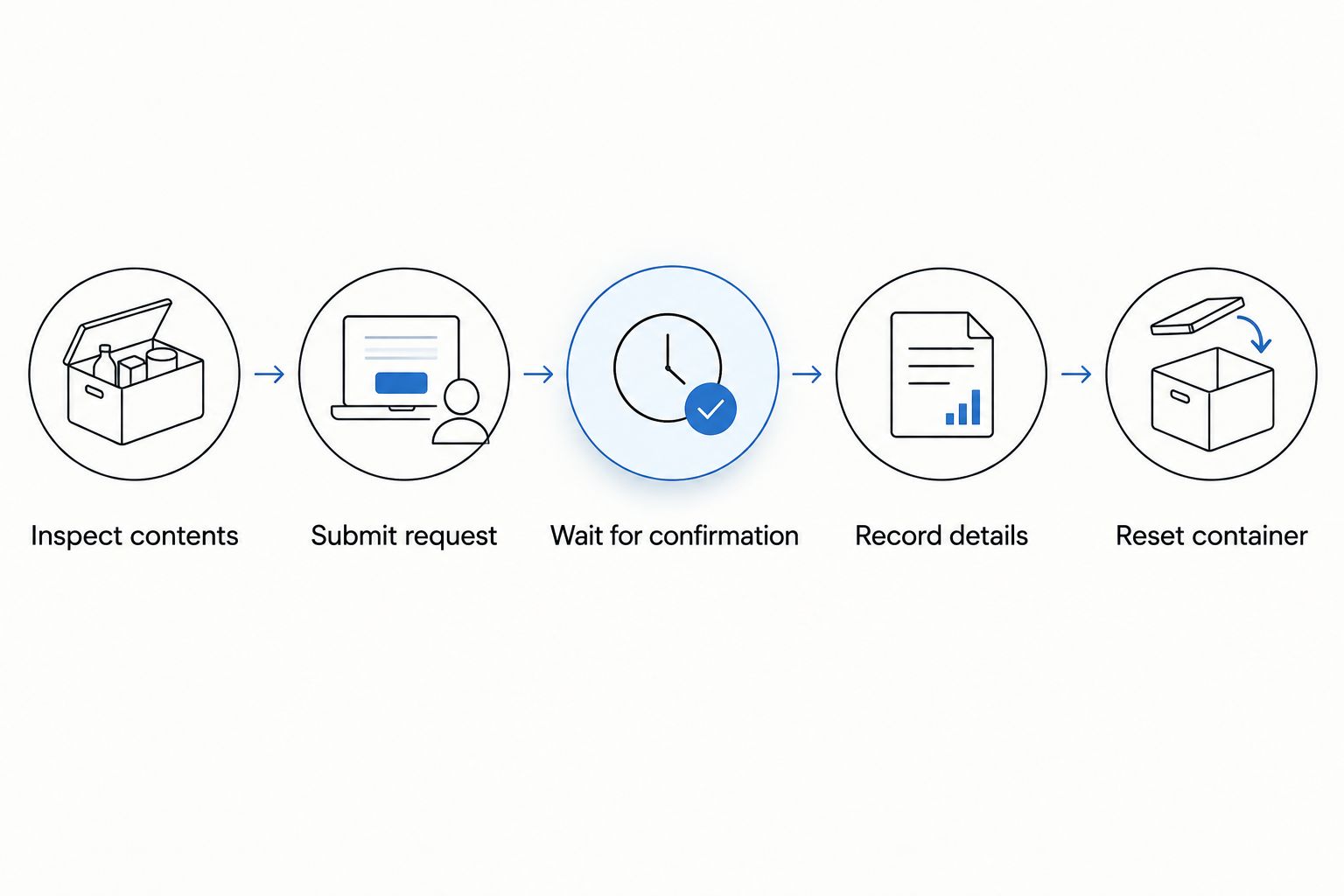
- Inspect the donation contents. Compare them with the provider's current accepted-item list. Remove anything the provider does not accept and give those items a separate disposal or reuse plan.
- Submit the actual request. Follow the provider's stated booking process. Supply the required address, contact details, item information, and access instructions accurately.
- Wait for confirmation. Do not treat a submitted request or your calendar reminder as proof of an appointment. Read the provider's response and resolve any questions before preparing for collection.
- Create a separate calendar event. Select Create, then Event, and enter Confirmed donation pickup. Use the date and collection window supplied by the provider rather than choosing an assumed time.
- Record the preparation details. Include the stated placement instructions and confirmation reference, if one was supplied. Select Save. Keep personal details out of calendars shared beyond your household.
- Reset after collection. Once the donations have left, return the empty container to its designated place. Leave the recurring check active so the next batch does not become forgotten storage.
Expected result: You have both a recurring check and a separate, provider-confirmed collection event. The donation container becomes usable again after removal.
Stashsavvy recommends reminders for follow-through, not as a substitute for a confirmed donation pickup. If the provider changes the arrangement, update the collection event to match the latest confirmation. The recurring closet check can remain unchanged.
Check donations whenever the bin fills
A weekly reminder is the backstop, not permission to keep an overflowing bag in place. Use this second version when you fill the donation container before the next calendar check.
- Stop adding items once the container reaches its limit. Keep any additional decisions separate rather than packing a second bag into the same space.
- Inspect the contents and begin the provider's booking process immediately when practical. If you cannot act then, create a one-time calendar event for your next suitable opportunity.
- Leave the recurring donation check active. At that check, review whether the collection is confirmed and whether the container remains safely contained.
- After removal, reset the station. Do not increase the container size simply to postpone another collection decision.
Expected result: The fill limit prompts action early, while the recurring reminder catches unfinished requests or forgotten bags.
For your 2026 setup, start with the simpler calendar routine if nobody in the household reliably notices the fill line. Use the container-led version when space is tight and its capacity is obvious.
Troubleshooting
The reminder appears, but you keep dismissing it
Move the recurring event to a time when you are near the closet. Keep the description focused on the next action, not a broad instruction to organize everything. If you cannot book collection during the check, create a specific follow-up rather than relying on memory.
The bag is full, but collection is not confirmed
Keep the bag in its designated indoor location while you resolve the request. Check the provider's response and booking status. Do not create extra holding space in a corridor, doorway, or shared area to make the problem disappear temporarily.
The provider does not accept some contents
Remove those items before collection preparation. Look for an appropriate reuse, recycling, or disposal route using local instructions. Do not mix rejected items back into the bag simply because you have already arranged collection for the rest.
Your shared calendar has conflicting pickup details
Keep one confirmed collection event as the household reference. Update it whenever the provider changes the arrangement, and tell the person responsible for preparing the bags. Avoid separate household events with different dates or instructions.
The closet remains crowded after donations leave
Donation reminders address outgoing items, not how you store everything you keep. Reassess the categories crowding the rail or shelves. Start with a specific bottleneck, such as shoes on the floor, rather than replacing the entire closet setup.
Customize your workflow
Once the basic routine works, add only the details your household needs. A shared calendar helps when one person sorts clothing and another handles collection. A private event is simpler when you manage the process alone.
Use the event description to record responsibility: who submits the request, who checks the confirmation, and who prepares the bags. Write names or roles clearly. Avoid an instruction such as someone should book this, which leaves the task unassigned.
If you prefer keeping decluttering tasks together, review Stashsavvy's decluttering apps guide before adding another tool. Your selection criteria should include accessible reminders, clear task ownership, and a record you can update—not an assumed automatic connection to collection providers.
During your next 2026 household review, ask whether the reminder catches donations before they obstruct daily use. If not, change the timing or reduce the holding space. Improve the trigger before adding more storage.
FAQ
Can I automatically book a donation pickup when my closet overflows?
This workflow does not automatically book a donation pickup. It schedules reminders so you can check the contents, submit a request through the provider’s process, and record the confirmed appointment.
What’s the simplest automatic donation pickup closet overflow routine?
Use a dedicated donation container and a recurring calendar check. Let the container’s fill limit prompt earlier action, and complete the pickup request separately.
Can Google Calendar tell when my donation bin is full?
The calendar workflow described here does not detect a full bin. You check the container yourself; the recurring event reminds you to do that check.
Should I use a weekly reminder or wait until the donation bag fills?
Use a weekly reminder as a backstop and act earlier when the bag fills. The reminder catches forgotten donations, while the fill limit protects your available space.
Can renters use this donation workflow without installing anything?
Yes, the workflow uses a movable container and a calendar reminder rather than installed storage. Check the building’s access rules and the provider’s collection instructions before arranging pickup.
When should I put donation bags outside for collection?
Put donation bags in the collection location only according to the confirmed provider’s instructions. A reminder or submitted request is not confirmation that collection is arranged.
What if the donation pickup is canceled?
Update or remove the confirmed collection event and arrange the next appropriate action. Keep the donations contained and leave the recurring check active so the canceled appointment does not become a forgotten pile.
One last thing
An empty donation bin is the point of the system, not a sign that you need to refill it. After collection, leave that space available and enjoy easier access to the clothes you kept.
Stashsavvy's final recommendation: keep the recurring reminder, but never let it stand in for confirmation. The useful milestone is not a full bag or a completed calendar check. It is donations leaving your home through an agreed collection arrangement.
Related guides
- Shoe storage racks for small closets
- Closet organizer systems
- Decluttering tools for home organizing beginners